Tools on the Record map
Opening the tools
Tap TOOLS on the right of the Record map. Its icon is a compass. It opens on the tool you used last, or on the tiles if that's where you left it. The arrow at the top left takes you back to the tiles and the cross closes the sheet. The tools go with the journey you're on, so its name sits under the title. TOOLS comes with the app update after version 3.12. If you can't see it, update Pebbls from the App Store or Google Play.
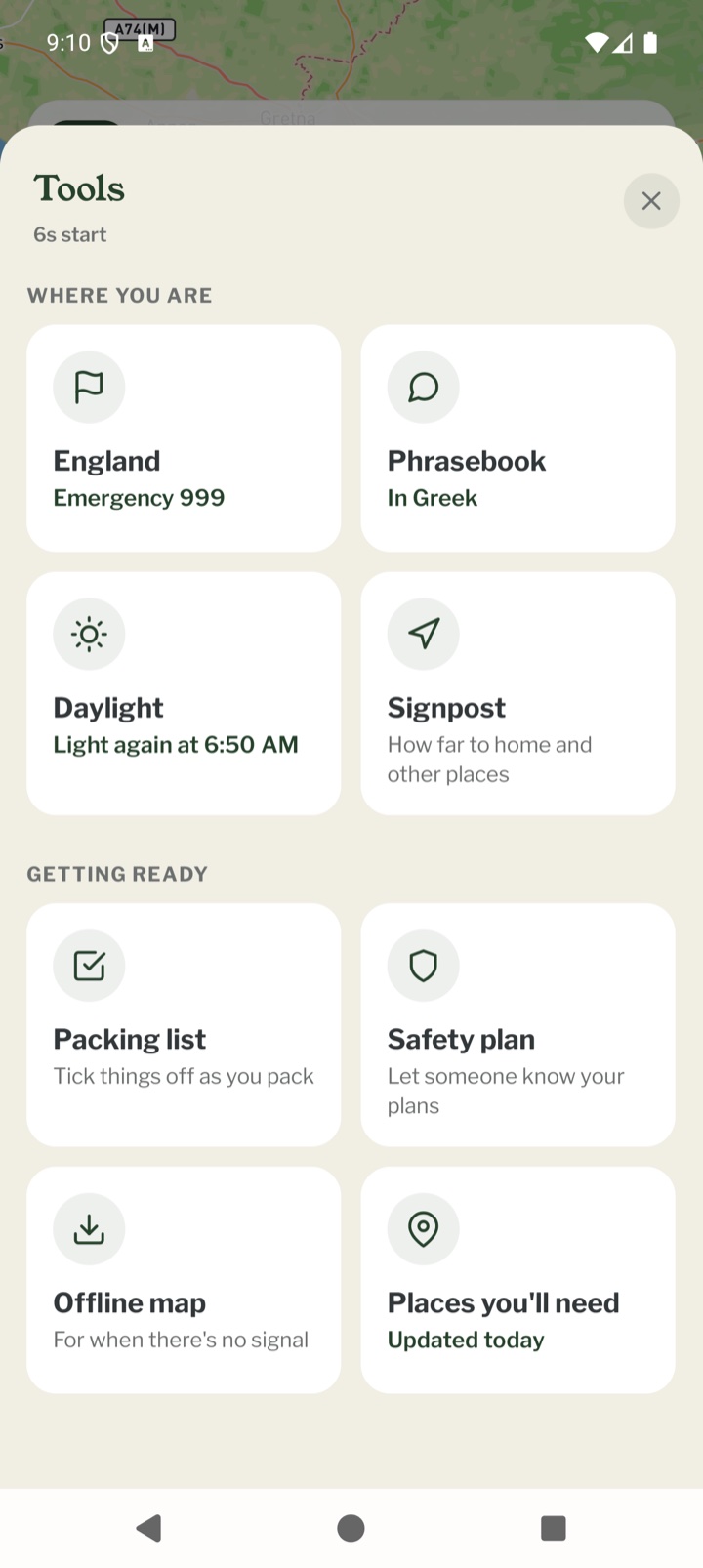
Where you are
The top four tiles are for the place you're in now.
- The country you're in: emergency numbers you can ring with one tap, plugs, driving, money and local rules. The tile shows the country's name once the phone knows where you are, and This country until then
- Phrasebook: useful phrases in the local language, to show someone or play out loud
- Daylight: how long until dark where you are
- Signpost: how far it is to home and other places, and which way
Getting ready
The bottom four are the things to sort before you set off, ideally while you still have signal.
- Packing list: a list for this journey to tick off as you pack
- Safety plan: tell someone at home where you're going and when you'll be back
- Offline map: keep the map of the area on your phone
- Places you'll need: drinking water, food shops, campsites and the like, kept on your phone
The line under each tile
Under each tile's name is a short line saying what it's for. Once there's something on your phone to report, the line turns green and tells you, for example Emergency 999, In Greek, 3 h 44 min left, Home is 1,200 km away, 12 of 30 packed, Sent, back by 18:00, Saved for this trip or Updated today.
Other ways in
The daylight pill on the Record map opens Daylight. The JOURNEY menu has Daylight, Packing list and Places you'll need under On the way. A safety plan reminder opens the Safety plan, and the card that suggests a packing list on a new journey opens the Packing list.
With no signal
The country facts, the phrasebook's words, Daylight and the Signpost are stored in the app, so they work anywhere. A packing list you already have can be ticked off with no signal and catches up with your account later. Making a new packing list, saving a map, downloading places and downloading phrase sound all need signal, so do those before you go. A safety plan can be made with no signal, but the message only goes once your phone can send it.
Free and Explorer
Every tool is free to use. Explorer adds a few things:
- the sound for every phrase in the phrasebook, not only the emergency ones
- places that keep themselves up to date as you travel
- room for 4 saved maps instead of 1
Mobile app
- The Record screen
- The bar at the bottom
- GPS tracking
- Journeys with no pebbls
- Live and standard tracking
- Tracking on the lock screen
- Transport modes
- The JOURNEY menu
- The country you're in
- Phrasebook
- Daylight
- Signpost
- Packing list in the app
- Safety plan in the app
- Editing a chapter
- Editing journey details
- App permissions
- App settings
- Offline maps and places
- Syncing and uploads
- Mobile data usage
- GPS signal tips
- Notifications
- Troubleshooting