Safety plan in the app
What it is
A safety plan tells someone at home where you're going, when you expect to be back and who to ring if you aren't. Open TOOLS on the Record map and tap Safety plan. It's the same plan as the safety plan on the website, so the person you send it to opens the same page. The app fills in what it can from your trip: the journey's name, the country for the emergency numbers, the activity from how you're travelling, and the next stretch of your route if you loaded one.
Filling it in
- Who's going: names and phone numbers
- Who's keeping an eye out: someone not on the trip who'll notice if you're late. They get the plan as a link, and they're the one who rings for help if you go quiet
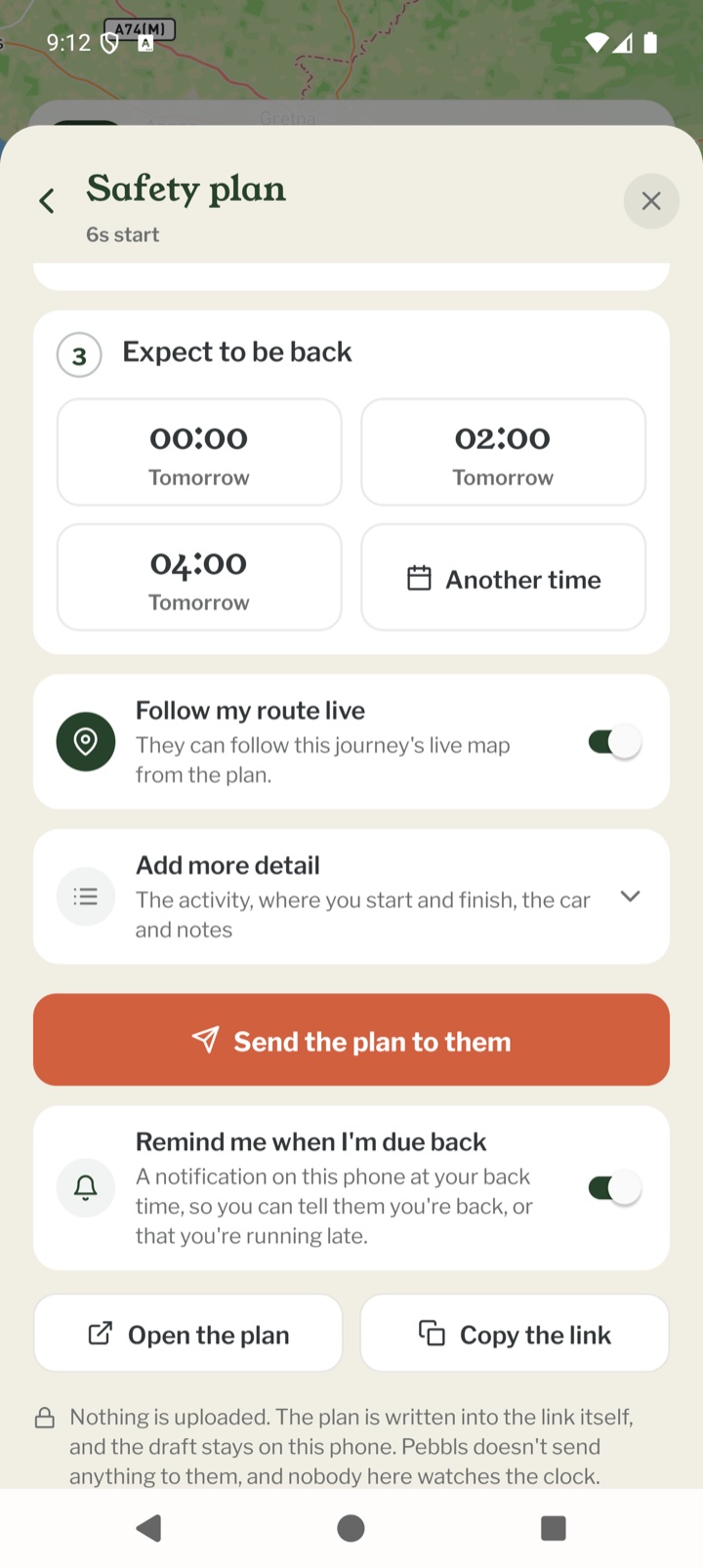
- Expect to be back: tap one of the times offered, or Another time. Worry if not back by then appears, two hours later to start with. Change it to a time you'd keep even on a slow day
- Follow my route live: on a public journey, your live map can go on the plan. It stays off a private journey, or one that blurs where you start or finish
- Add more detail: the activity, where you start and finish, the car and notes
Sending it
Tap Send the plan to and the person's name. Your phone's share sheet opens with the message written, so you can send it by WhatsApp, text or email. Open the plan shows you the page they'll see, and Copy the link copies it. The plan is written into the link itself, so nothing is uploaded, and the draft stays on your phone. You can make the plan with no signal. The message goes once your phone can send it.
The reminder when you're due back
Remind me when I'm due back is on unless you turn it off. At your back time a notification asks if you're back from the trip, with two buttons. I'm back opens a message to tell them you're back safe. Running late lets you pick half an hour, an hour, two hours or three, and sends them a new link with the new times. If the worry time is well after your back time, a second reminder comes half an hour before it. Notifications need to be turned on for Pebbls, or there's no reminder.
Once it's sent
The Safety plan tile then says Sent, back by and the time. The plan shows when you're due back and when they'll start to worry, with I'm back, Running late, Send the plan again, Change the plan and Make a new plan. If you change the plan, send them the new one, as the old link still shows the old times. Each journey has one plan on your phone.
What it isn't
Pebbls doesn't send anything to them, and nobody here watches the clock. If you're in trouble, ring the local emergency number yourself. You'll find it under TOOLS, on the country tile.
Mobile app
- The Record screen
- The bar at the bottom
- GPS tracking
- Journeys with no pebbls
- Live and standard tracking
- Tracking on the lock screen
- Transport modes
- The JOURNEY menu
- Tools on the Record map
- The country you're in
- Phrasebook
- Daylight
- Signpost
- Packing list in the app
- Editing a chapter
- Editing journey details
- App permissions
- App settings
- Offline maps and places
- Syncing and uploads
- Mobile data usage
- GPS signal tips
- Notifications
- Troubleshooting