Notifications
What Pebbls tells you about
Pebbls tells you about activity in three places: the Notifications screen in the app (the bell), push notifications on your phone, and email. Choose what you get under Settings › Notifications; the same options are under Account › Communication on the website.
The notifications screen
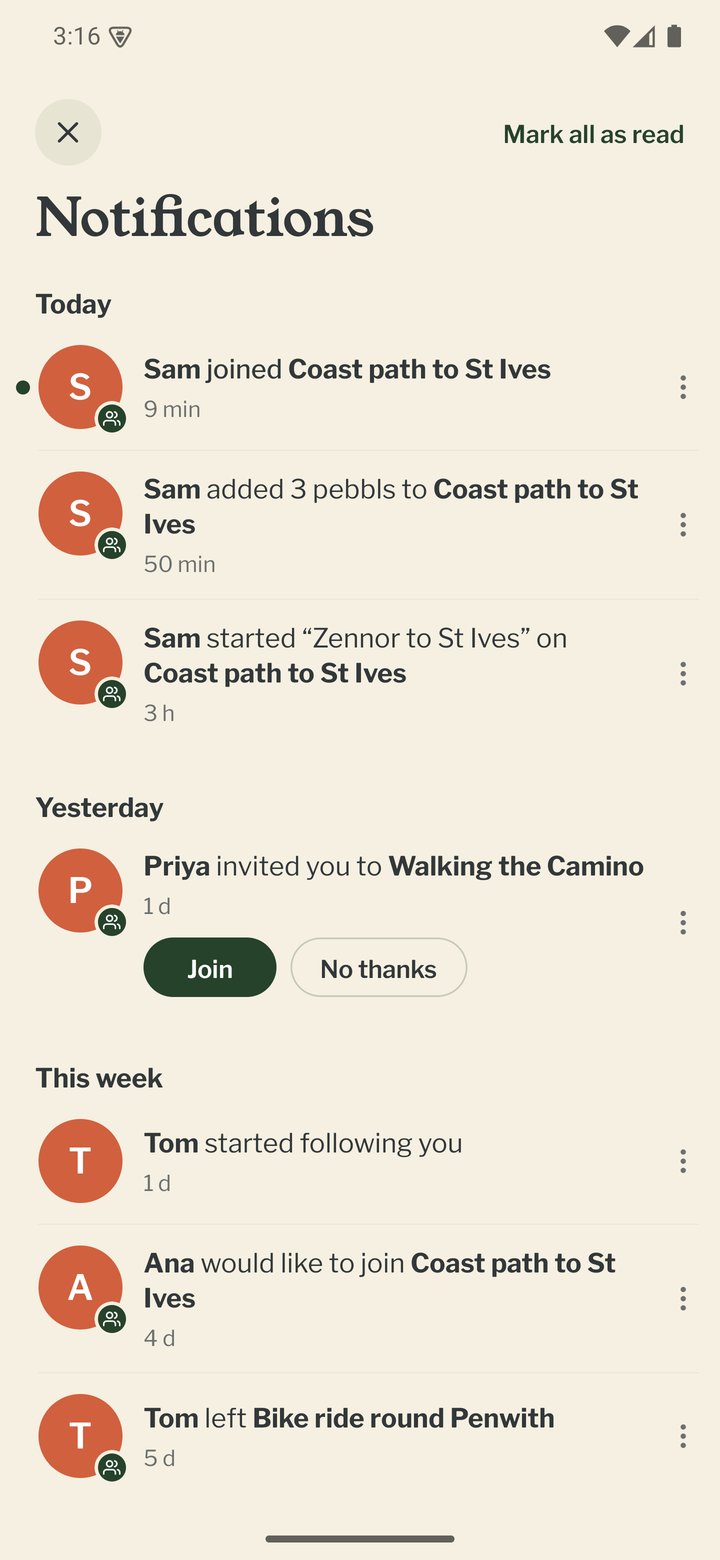
Tap the bell at the top of the app, on any tab. It turns orange with a number when something is new. Anything new has a green dot, and Mark all as read at the top clears them. The list is grouped into Today, Yesterday, This week and Earlier, and covers: reactions, comments and replies on your pebbls and flyby films, new followers, new pebbls from people you follow (one line for each person, journey and day, such as Sam added 6 pebbls to Coast to coast), @mentions of you and replies to discussions you started in communities, notes from your communities, a flyby film that is ready to watch, your trip summaries and badges you have earned. Several reactions to the same post are grouped ("Sam and 2 others"). Tap an item to open it; tapping a push notification opens the same screen. Press and hold an item from someone (or tap ⋮ next to it) to report or block them. Notices about a journey you share, such as an invite or someone joining, have a small green badge with two people on the person's photo. On the website, the bell at the top of the page shows the same list.
Tracking alerts
These come from the app itself and are always on while tracking: auto-stop warnings, tracking stopped, poor GPS signal, low battery and upload progress.
Messages from the app
Reminders from the app itself, such as your phone's clock being wrong, an update being ready, or your profile missing a photo or bio, appear as a single banner. Tap it to act on it or swipe it away to dismiss it.
Push notifications
Comments and replies, likes and reactions, new followers, new pebbls from people you follow, pushes when someone you follow starts a journey or chapter or is on the move, your flyby film being ready, your trip summary, "On this day" memories, and new travel badges (at most once a day). If you're not an Explorer, you may now and then hear that a lot of people have looked at your trip (see "Explorer membership"). Quiet hours stops pushes at night in your local time; everything still waits on the Notifications screen.
Trip summaries
When one of your journeys ends you get "Your trip in numbers": distance, days and pebbls, which opens the journal. It comes as a push if you use the app, or as an email with your best photos if you don't. A journey ends when you tap End Journey or start a newer one (the summary comes a day later), or when nothing new has arrived for three weeks (six if you're mostly on the water). Journeys under 20 km with fewer than 5 pebbls don't get one. Turn it off with the Trip summaries switch in Settings › Notifications in the app, or Account Settings › Communication on the website.
Flyby film messages
You hear when a chapter you've been adding to gets its first flyby film: a push if you use the app, or an email if you don't. If you later add, move or remove pebbls or photos in the chapter and the film is made again, you hear about the new one too. Films made again because the route alone changed, and first films for chapters you haven't touched for a couple of weeks, arrive quietly. To keep it from getting noisy, a message waits until the chapter has been left alone for 12 hours, and you get at most one a week about the same chapter and one a day in all. On a public journey your followers with the app get a push about the film too, at most once a week for the same journey.
Safety plan reminders
If you send a safety plan from the app and leave Remind me when I'm due back on, your phone reminds you at your back time, with I'm back and Running late. If the worry time is well after your back time, a second reminder comes half an hour before it. These are set on your phone when you send the plan, so they come even with no signal (see "Safety plan in the app").
Packing reminders
When you start a new journey, a small card on the Record map suggests a packing list for it. It's a card, not a notification, and comes once for each journey. A packing list kept with your account on the website can also send a reminder three days before you leave, with what's still to pack, as a notification if you have the app or by email.
Website and email
The same activity by email, plus community updates, the weekly digest of your activity, the Pebbls newsletter, an email when a flyby film is ready if you don't use the app, and big badge milestones (at most once a week). The Travelling together emails switch covers an email when you're invited to a journey, when someone joins or leaves one you share, and when a shared journey is deleted.
Your week
The weekly digest email opens Your week on Pebbls: your stats for the week, any new flyby films, your chapters and Pebbls, who has been following along, and what explorers you follow and your communities have been up to.
What your followers get
When you add pebbls to a public journey, your followers hear once you've been quiet for two hours, so a burst of pebbls arrives as one message (and never more than 3 emails a day). Followers with the app also get a push when you start a new public journey or chapter, now and then while you're on the move, and when a new flyby film is ready. Followers who chose A weekly email get one email on Sunday evening instead. Private journeys and private pebbls don't reach your followers. The exception is people who tapped Follow along on that private journey itself: they hear about that journey only.
Emails about your trip
People who leave their email address on the journey page get a short email in the evening on days with news, with that day's route and photos. They can change it to once a week, on Sunday evening, from any of them. Followers with an account who chose A weekly email get the Sunday one, and so do people who signed up before the evening email started and haven't changed it. Under Sharing in the account menu on the website, each journey shows Emails about this trip: N people. Open it to see who gets them, remove anyone, or type in the email addresses of family and friends and press Invite them. They get one email asking them to say yes, and nothing more unless they do. Password-protected journeys don't send these emails.
Mobile app
- The Record screen
- The bar at the bottom
- GPS tracking
- Journeys with no pebbls
- Live and standard tracking
- Tracking on the lock screen
- Transport modes
- The JOURNEY menu
- Tools on the Record map
- The country you're in
- Phrasebook
- Daylight
- Signpost
- Packing list in the app
- Safety plan in the app
- Editing a chapter
- Editing journey details
- App permissions
- App settings
- Offline maps and places
- Syncing and uploads
- Mobile data usage
- GPS signal tips
- Troubleshooting