Packing list
What it's for
The packing list gives you a starting list for the kind of trip you're going on, and you change it from there. It only puts on the things you'd miss, and it expects you to wash clothes as you go rather than carry a fortnight of socks. It's free and works without an account.
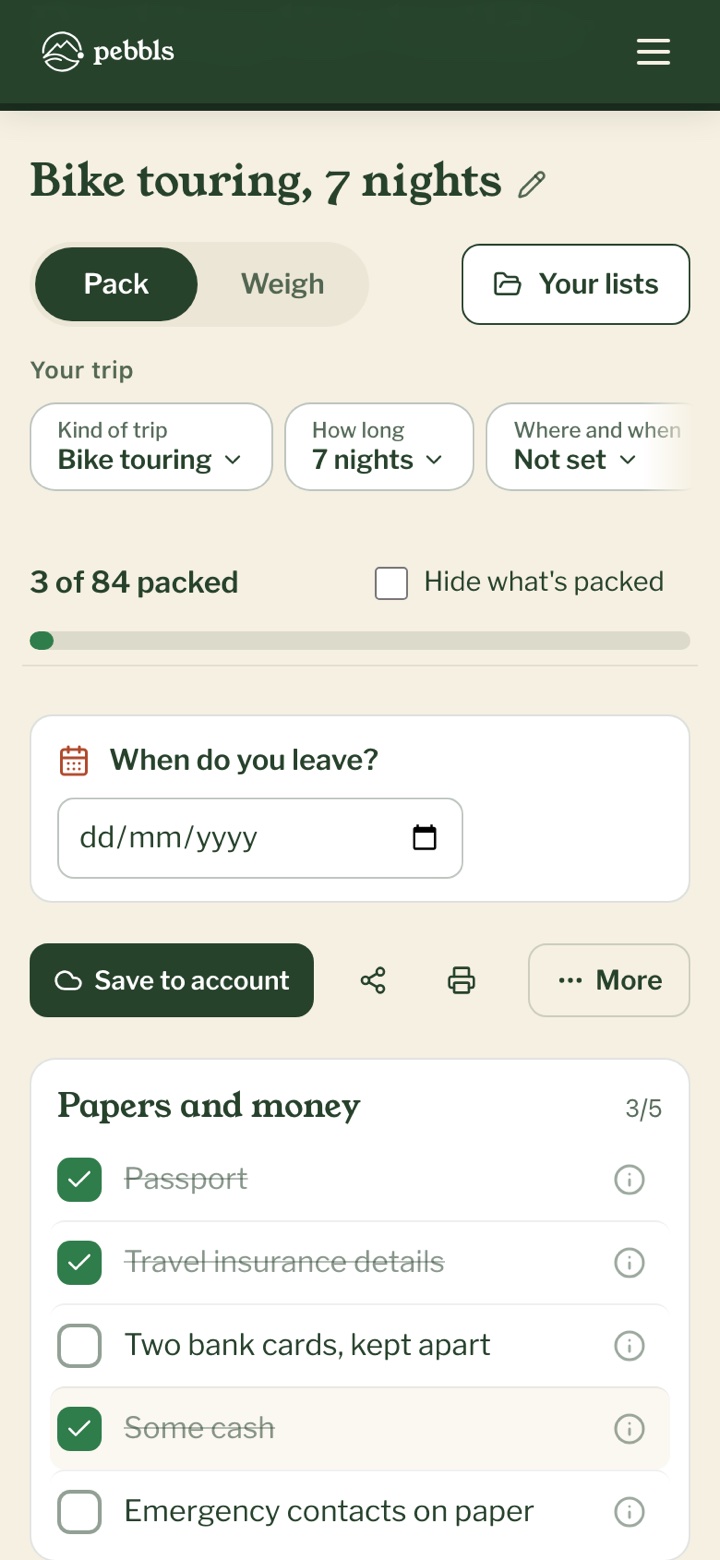
Making a list
- Open the packing list and pick a kind of trip, such as "Hiking", "Bike touring" or "City break". Your list appears straight away
- Under "Your trip", tap a row to change how long you're away, the weather, where you'll sleep and anything else. The list changes to match, and keeps your ticks and anything you've added
- Put where you're going and the month in "Where and when" and the weather is filled in from thirty years of records for that place. A cold month brings a warm hat, a wet one a waterproof
- Tick things off as you pack. "Hide what's packed" leaves only what you've still to find
Taking any of these?
The "Taking" row asks about the things that need their own chargers and spares: a camera, a laptop or tablet, a GPS watch or bike computer, a satellite messenger or PLB, and a drone. Pick the ones you're bringing and tap "Done", and each goes on the list with its charger, batteries or cable.
Weigh and My kit
Switch the list from "Pack" to "Weigh" to see what it all comes to: the base weight, what you wear, what gets used up, and the total. Every item starts with a typical weight, marked ~. Type in your own and it goes into "My kit", so your next list already knows it. You'll find My kit under "Your lists", with everything you own and its weight, and you can start it from a typical kit for the kind of trip.
Keeping your lists
Your lists stay in this browser, and once the page is open the ticking works without signal. To have them on your phone and your laptop too, tap "Save to account", sign in if you're asked, choose which trip it's for (or "Not one of my trips") and tap "Keep it". Anything you tick out of signal is sent when you're back online. All your lists are under "Your lists".
A reminder before you go
Put the day you leave in "When do you leave?". Once the list is kept with your account, "Remind me 3 days before" appears, already switched on. On the morning three days before, we send you a reminder with what's still to pack, as a notification if you have the Pebbls app, or by email. If you're leaving in less than three days there's no reminder that time.
Printing and sharing
"Print" gives you a clean page to tick off with a pen. "Share" makes a link that holds the whole list. Send it with "Send…", or "Copy the link" and paste it into a message. Whoever opens it can tap "Keep a copy" to have their own. Under "More" you can also save the list as text, untick everything for the next trip, or make a copy and change it for somewhere colder.
In the Pebbls app
Lists you keep with your account show up in the app under TOOLS › Packing list, where you can tick them off with no signal. You can also make a list in the app. See Packing list in the app.
What it doesn't do
The weather is what's usual for that place and month, not a forecast, so check the forecast before you go. A shared link is a copy, so two people can't tick the same list together, and changes you make later don't reach theirs.