Travelling together
One journey for all of you
If you travel with someone, you can keep one journey together instead of one each. Everyone tracks the route on their own phone and adds pebbls with their own name on them. The journey shows on everyone's profile, and people who follow any of you see what's added.
Invite someone
You can invite people in the app or on the website. If you switched on Travelling with someone? when you started the journey, Travelling with opens by itself once the first chapter has started.
- In the app, tap JOURNEY at the top of the Record screen (on small phones it's a map icon), then Travelling with. Under Invite someone, tap Send an invite link or Invite by name. It works on the journey you're on now, so to share another one, pick it under Continue a journey first
- Send an invite link opens your phone's share options, so you can send it by message, WhatsApp or email. Anyone who opens it asks to join, and you say yes or no to each person
- Invite by name finds someone who's already on Pebbls. The app checks with you first (Invite Sam to “Coast to coast”?), and you tap Invite or Cancel. They get a notice and join as soon as they say yes
- If the free place is taken, you'll see Get Explorer instead of the two ways to invite
- On the website, open the journey, click Edit journey details and scroll to Travelling with. Copy the invite link or make a new one, or use Already on Pebbls? Invite them by name. Invites still waiting are listed under Waiting for an answer, with Cancel invite
What they can do
If it's your journey, Travelling with shows what the others can do, above Invite someone. They can't change your pebbls or the journey's details, and you can take someone off at any time.
- Track the route on their own phone
- Add pebbls and photos, with their name on
- Start a new chapter for everyone
- See every pebbl on the journey, private ones too
- See your live dot when you share Live location
When someone invites you
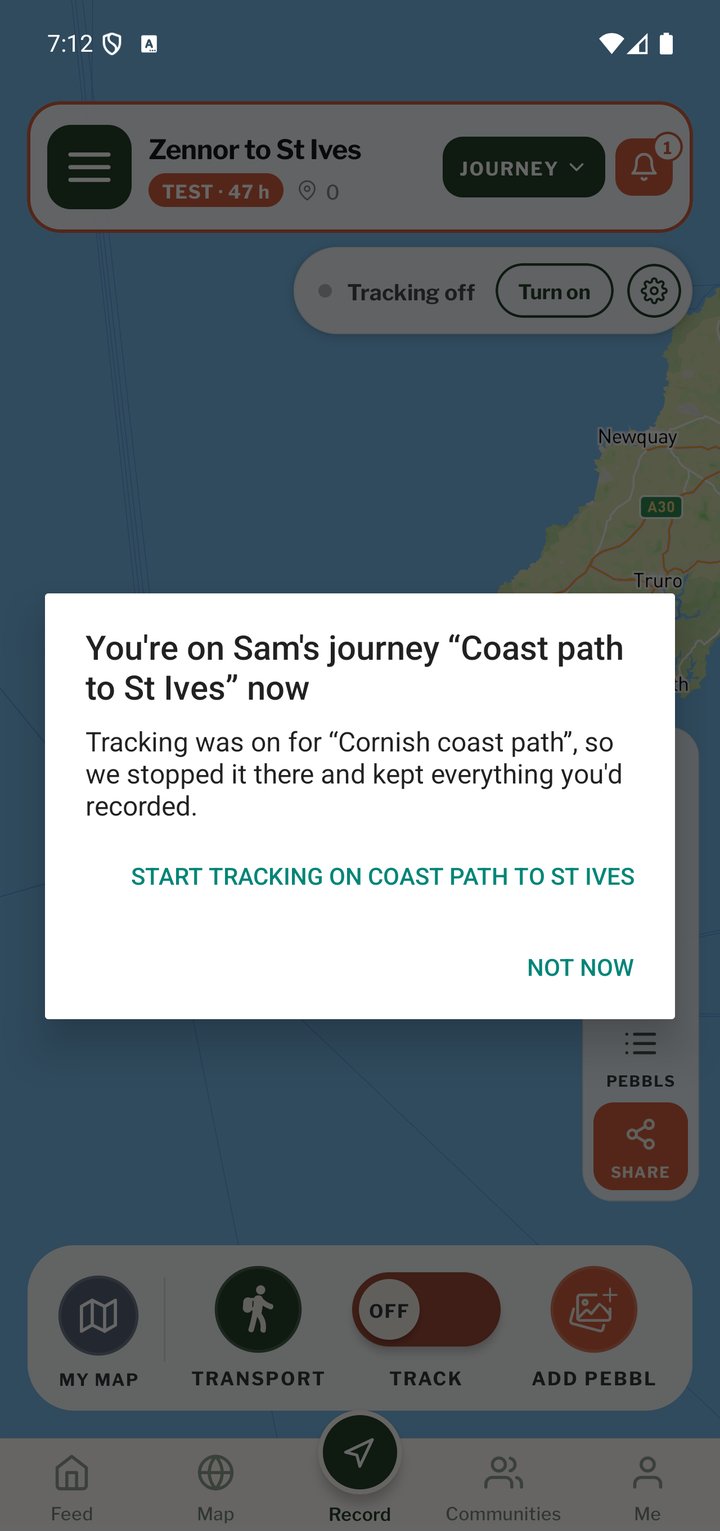
If someone invites you by name, you get a notice on your phone and a banner on the Record screen. Tap it to see the journey and who invited you, then choose Join or No thanks. On the website the same invite opens a page with Join the journey and No thanks. An invite link works differently. The page it opens has an Ask to join button (Sign in to ask on the website if you're not signed in), and you're on the journey once the person who started it says yes. Once you're on it, the journey opens on your phone by itself and a notice says so, such as You're on Sam's journey “Coast to coast” now. Tap TRACK when you set off and your route goes into it. If you were tracking another journey, Pebbls stops tracking there first. Nothing you tracked on that journey is lost, and Start tracking on Coast to coast carries on with the new one. If the person says yes to your request while you're tracking a different journey, the app asks first (Sam said yes). Switch now moves you across. Later leaves everything as it is, and the journey waits in your list until you pick it.
Who's tracking
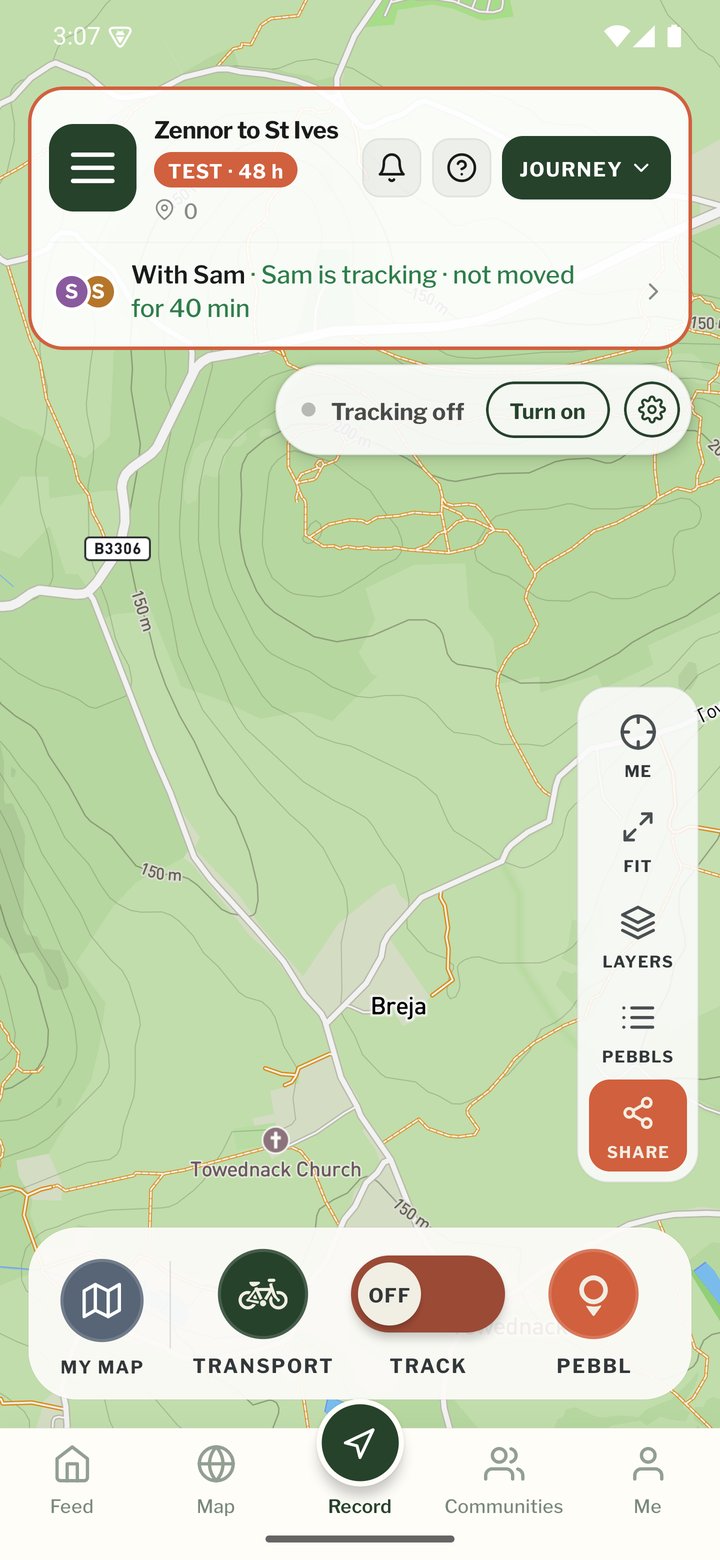
Shared journeys show everyone's profile photo in Continue a journey, in a ring the same colour as their line on the map (their initial if they haven't added a photo). Yours says With Sam, and one you've joined says Sam's journey. On the Record screen there's a line under the top bar with the same photos. When there's one other person, it also says whether they're tracking: With Sam · Sam is tracking, Sam isn't tracking or Sam has location turned off. If Sam's phone is tracking but hasn't moved for half an hour, it says that instead, for example Sam is tracking · not moved for 40 min. While Record is open the line checks again about every 15 seconds. Tap the line to open Travelling with.
Tracking the route
Each phone tracks when its own person taps TRACK, and tapping it again only stops that phone. Everyone tracks into the journey's newest chapter. If a phone has no signal or is in aeroplane mode, it keeps tracking and sends its route and pebbls when it's back online. They go into the right chapter, even if someone started a new one in the meantime.
Chapters
Anyone on the trip can start a new chapter and give it a name. A chapter lasts until someone starts the next one, so it can be a day or a fortnight. When someone starts one, everyone else's phone moves to it and they get a notice saying who started it. If two of you press New chapter at almost the same moment without knowing about the other, Pebbls keeps it as one chapter.
What the map shows
When you're together the map draws one line, taken from whichever phone tracked better, and a gap on one phone is filled from another. If someone is more than a kilometre away for more than ten minutes, their route shows as a separate line in their own colour until you meet up again. The main line follows whoever most of the group is with, so it carries on if one of you goes home early. Each chapter shows how far each person went. If you'd rather the line came from a particular phone for part of a chapter, the person who started the journey can choose: on the website, the chapter's box in the journey editor has Whose phone the line comes from, listing the stretches you tracked together. The recordings themselves never change.
Pebbls and photos
Everyone can open every pebbl on the journey, and its card says who added it. The person who started the journey can change or delete any pebbl on it. Everyone else can change or delete only the pebbls they added. Private pebbls are seen by the people on the trip and nobody else.
Your home stays private
The chapter's location mask hides where each person starts and finishes, wherever that is, so your own front door stays hidden even if you set off from a different place. Tracking privacy covers your own line. Your live dot only shows if you share Live location.
Free and Explorer
One person can travel with you for free. With Explorer, the person who started the journey can have up to 20 people on it with them. If their Explorer ends, everyone already on the trip stays, but nobody new can join until it's renewed.
Leaving, or taking someone off
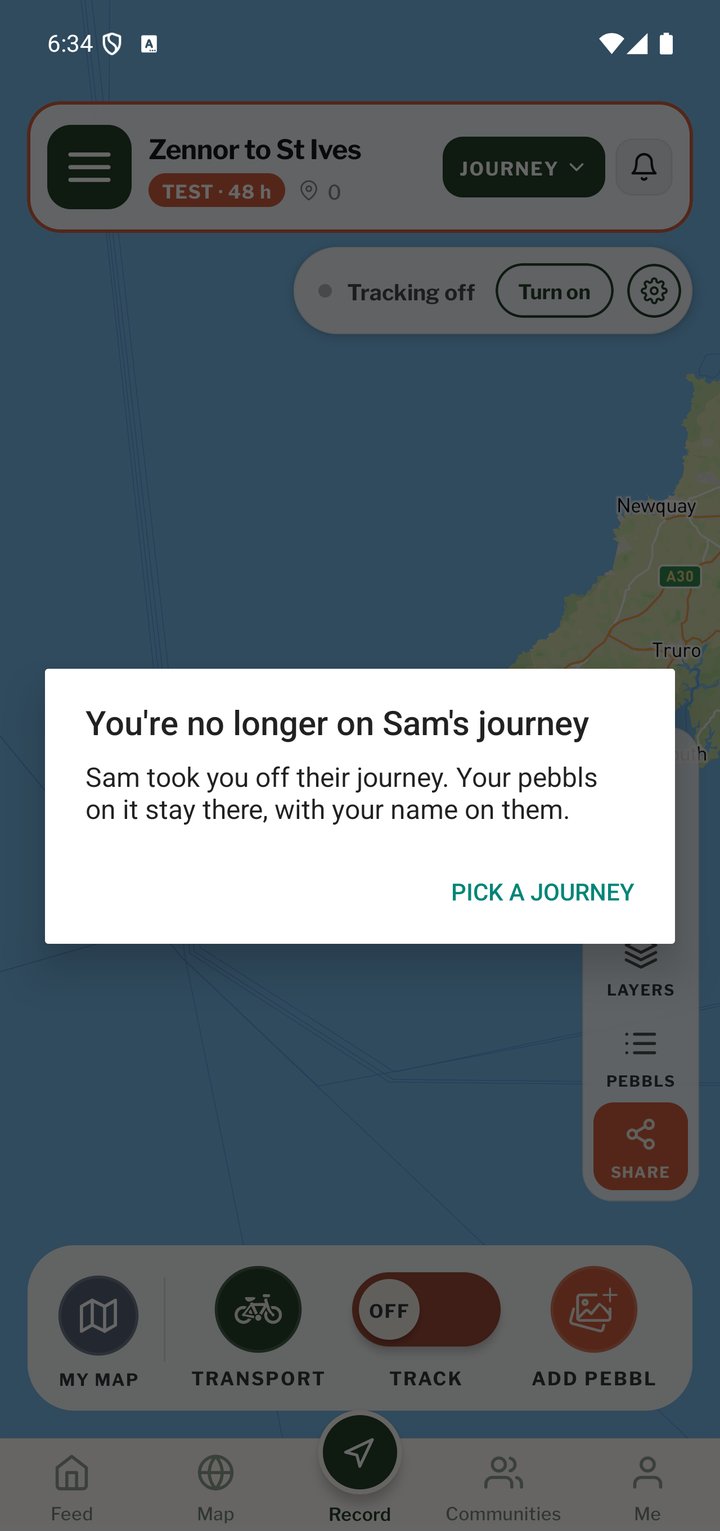
If you're on someone else's journey, you can leave whenever you like with Leave this journey, in Travelling with in the app or on the journey's page on the website. If you're tracking into it, the app asks you to stop tracking first. The person who started the journey can take someone off with Remove in Travelling with. Either way, the pebbls that person added stay on the journey with their name on them. Someone who was taken off can't use the old invite link again. To have them back, invite them by name, or make a new link on the website with New link. Send an invite link in the app sends the same link as before. If you're taken off a journey, or the person who started it deletes it, while you're tracking into it, your phone stops tracking into it, within a few seconds if Pebbls is open. A message tells you why, such as You're no longer on Sam's journey, and Pick a journey lets you choose where your route goes next.
When the trip ends
When the person who started the journey taps End journey, everyone is told and picks which journey to track into next. If nobody has tracked on a shared journey for a couple of days, tapping TRACK asks whether you're still on it, so a walk at home doesn't end up on someone else's trip.
Your copy
When you download your data from a shared journey, you get your own route and pebbls in full, and the shared line for the days you were on the trip. If you were taken off a journey, you get only your own route and pebbls.