Fundraising on a journey
What it does
If you're walking, riding, paddling or sailing for a charity, you can put your donate link on the journey. People who follow your journey see who you're raising money for, how far you've got towards your target, and a Donate button. It's free. Pebbls never handles any money: the button opens your own fundraising page, so everything goes straight to it.

Set it up
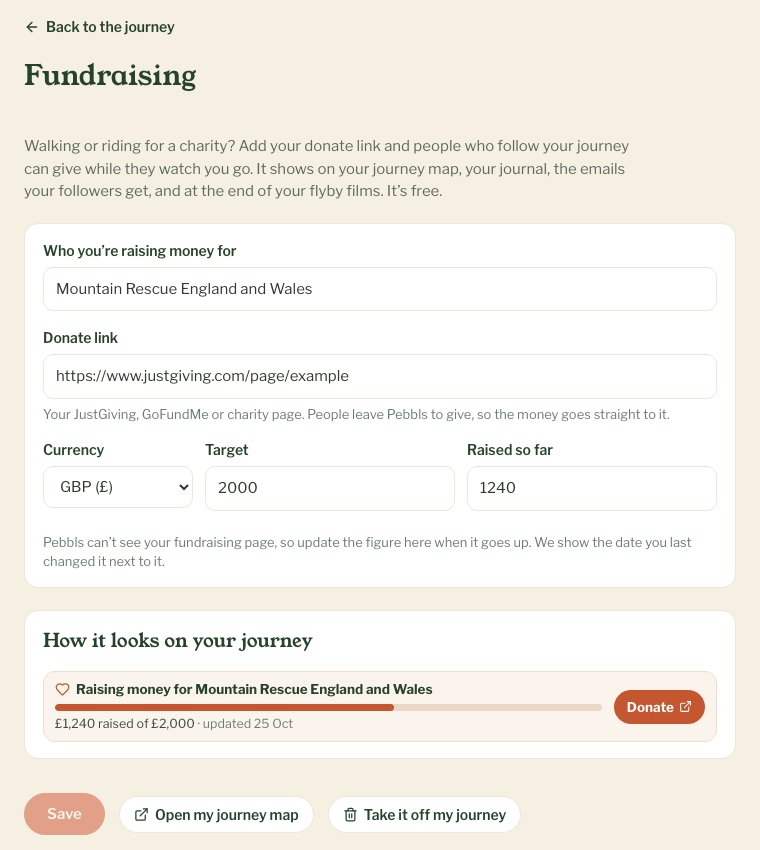
- On the website, go to www.pebbls.com/dashboard (My journeys), pick the journey and choose Fundraising. When you make a new journey you can also tick I'm raising money for a charity, and the Fundraising page opens straight after
- Write who you're raising money for, for example Macmillan Cancer Support
- Paste your donate link. Copy it from your JustGiving, GoFundMe or charity page. It should start with https://
- Add a target and pick the currency if you'd like a bar that fills up. You can leave it empty
- Put in how much you've raised so far, check the preview and save
In the app
In the app, Fundraising is in the JOURNEY menu, and you can tick I'm raising money for a charity when you start a new journey. Both open the same page as on the website.
Where it shows
- On your journey map, with a Donate button
- At the top of your journal
- In the emails your followers get about new pebbls, and in the weekly email
- At the end of your flyby films. A film can't be tapped, so it shows the charity and the bar but not the link
Keeping the total up to date
Pebbls can't see your fundraising page, so it doesn't know when people give. Change the Raised so far figure yourself when it goes up. Next to it we show the date you last changed it, so nobody mistakes an old figure for today's.
Private journeys
On a private journey the Donate card only shows to people who can see the journey.
Taking it off
Open Fundraising for the journey and choose Take it off my journey. The card, the bar and the button go from your map, journal, emails and new films.
More about it
There's a page about fundraising walks and rides at www.pebbls.com/fundraising-walk-tracker.